Welcome to the z.ink O.rigin Campaign guide! If you are looking to secure your slice of the z.ink airdrop pie, then you’ve come to the right place! Below, we’ll go over everything you need to know, plus as many things as possible that could be unclear.
Airdrop Campaign(s)
The z.ink team (ATMTA) will airdrop between 30% and 40% of their Total Token Supply (TTS) across four campaigns, spanning roughly 2 years. The O.rigin campaign, live now, is the first of these campaigns and will distribute the initial 10% of the token supply to everyone who participates and earns zXP.
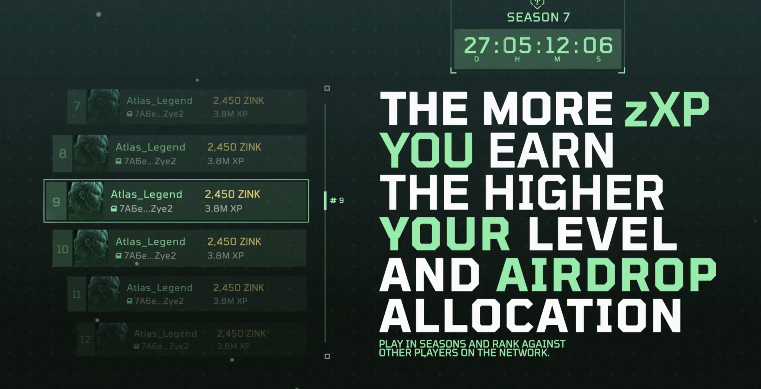
The more zXP you accumulate, the bigger your slice of this 10% pie will be!
Please note that the number of z.ink tokens earmarked for this first airdrop is fixed. This means your proportional share of zXP earned relative to the total amount of zXP earned by all participants is what determines how much of the airdrop you will receive.
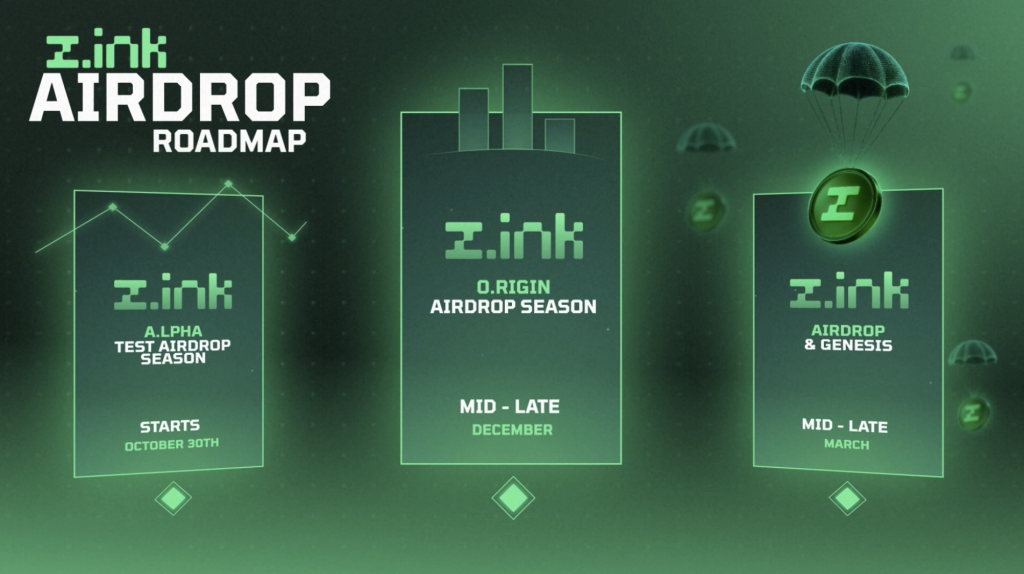
z.ink Airdrop Roadmap
The z.ink L1 Chain
In the first half of 2026, the Star Atlas team (ATMTA) will launch its own L1 blockchain, called z.ink, which is essentially a Solana fork (and thus also powered by SVM). You can read more about this in our guide on the chain itself. For this guide, one aspect is important:
The team plans to airdrop an initial 10% of the total supply of their protocol token (z.ink) during the genesis event of their mainnet (in other words: as soon as the network is live) to participants of the O.rigin campaign.
O.rigin Campaign Overview
For those who want the TLDR, look no further! Note that we will expand on the points below in further detail later in this guide, but here are the essentials:
- Duration: at least 3 months, could go on a little longer
- Reward: Allocation from the 10% z.ink token airdrop (10 million tokens total)
- Distribution: Based on zXP (z.ink Experience Points) earned; your zXP share of the total zXP earned by participants determines your portion of the airdrop.
Earning zXP
zXP is earned through in-game and ecosystem activity, including:
- Holosim — low weighting
- UE5 (Gunplay & Racing) — medium weighting
- Faction Claims — medium weighting
- SAGE — medium/high weighting
- Primary Marketplace Sales — high weighting
- ATLAS Locked / POLIS PVP — high weighting
Historic performance does not count; only activity after wallet linking is tracked.
Bonuses and Multipliers
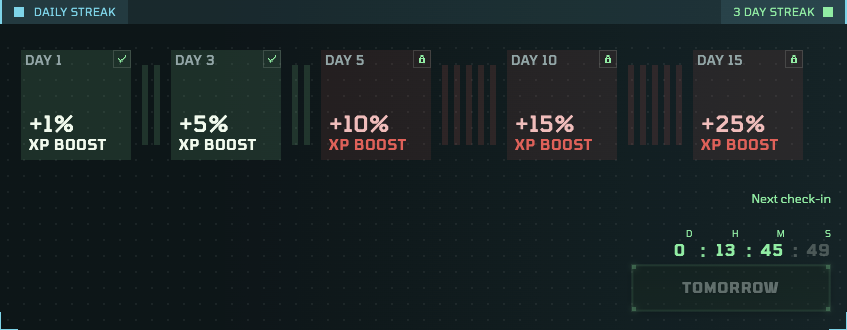
- Daily Streak Bonus: Claim daily to build a streak, which can lead up to a +25% zXP multiplier!
- Subscriptions (Alpha, Aura, Apex): Optional paid plans that grant additional zXP multipliers and future perks.
Quick Start
Before we go into all that it entails, let’s first get you registered and set up with a zProfile! This is a hard requirement to participate in the z.ink Airdrop campaign.
Steps – Registering:
- Go to https://z.ink and click the Create your zProfile button.
- Read the Terms of Service and Disclaimer, and then connect your wallet.
A few notes here:
- If you do not have a wallet installed, you will be sent to the Backpack.app website to download their wallet extension for your browser.
- If you have multiple wallets to choose from, you’ll experience the least friction when selecting the wallet you use to play SAGE (if you are already playing the game). This is not a requirement, however.
- You will then be asked to sign a message to prove you are the wallet owner.
- If you connected a wallet that you also use to play SAGE, your SAGE profile will be reused for your Zink profile (zProfile).
Otherwise, you will be greeted with a “Create Profile” dialog. Here, you’re asked to choose your public profile name. After you spelled yours out, click the button at the bottom to sign another on-chain transaction to store it.
Note: When creating a new profile, an error will occur when you do not have at least 0.15 SOL in your wallet. You will need only a small part of that to pay for the rent, however. - Your session will be created, and the z.ink Dashboard will greet you!
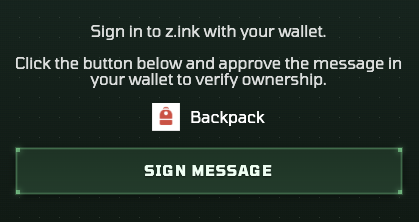
z.ink – Example of a message signing request (step 3).
Note: If you are using a wallet outside Phantom, Solflare, or Backpack, it may not appear in the wallet selection pop-up. The z.ink ecosystem only supports wallets that adhere to Solana’s Wallet Standard. If your wallet does not, it is advisable to migrate to a modern wallet that adheres to this standard.
Adding Additional Wallets
The campaign now knows you exist! Next, add all other wallets you use to participate in the Star Atlas ecosystem. Continue reading to learn which wallets you need to hook up. Below, we’ll explain how to get those added first.
Adding another wallet is a bit involved because when you connect another wallet in your browser extension, the website won’t update to reflect the change, and you will likely see the wallet you connected last. There is a workaround to fix this, which requires you to refresh the webpage.
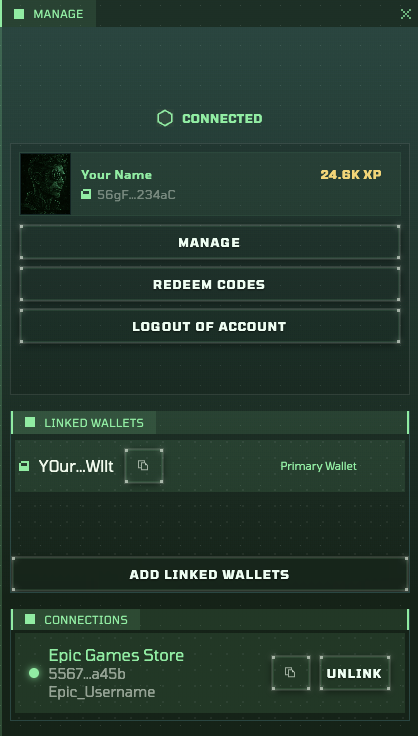
z.ink Dashboard – Profile pop-up
Steps – Adding another wallet
- Go to your wallet (extension) and select the wallet you want to connect
- Refresh the website (yes, this is really needed at the moment, see the above section)
- If all goes well, you will still see that your profile (attached to your previously selected wallet) will be loaded correctly
- Click on your account name in the top right corner of the dashboard
- Click the Add Linked Wallets button in the pop-up that appears
- Read the disclaimer (at least the first time), and hit Continue
- You will see a list of the connected wallets. Click the wallet you want to add and hit Confirm
- Next up, sign the message to confirm ownership
If all goes well, your wallet will have been added to the list.
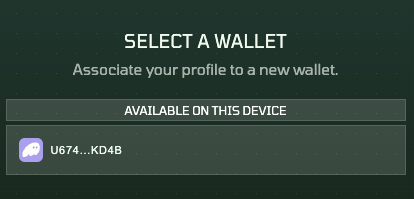
z.ink Dashboard – Adding Linked Wallets (step 7)
If you only see the same wallet you already connected to, you likely did not complete step 2 (refresh the website). You must refresh the page after selecting another wallet in your wallet interface (Phantom, Solflare, etc.).
You will have to repeat this process for every wallet you want to link.
Three zXP Tracks
The zXP you earn through various activities contributes to three different progression tracks:
- Zink Level — Your overall zProfile level. It never resets and is listed on your ID Card (top-left of the dashboard).
- Airdrop Season Level — This level resets with every new airdrop season. It currently tracks the O.rigin season (Season 1). This is the level shown on the leaderboard.
- Multipass Rank — Multipass operates independently of Airdrop Seasons. It comes with its own seasons, each tied to (potentially) different start and end dates, and resets every time a new season starts. Instead of levels, Multipass uses ranks. Your current rank is shown in the Multipass header on the dashboard. Note that zXP only counts towards a Multipass rank progression when you have a live subscription.
At this moment, this being the first airdrop season, your Zink Level and Airdrop Season Level will be the same. However, for future airdrop seasons, these will deviate. Your Zink Level will never be reset from here on out (note that during the A.lpha test campaign, there was a hard cap of level 20). Your Airdrop Season level will reset before the start of every new Airdrop Season (there are four planned at this point in time).
The zXP Earning Tasks
The best indicator of whether you hooked up everything correctly is the list of tasks:
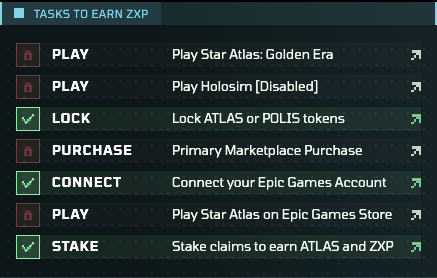
List of tasks to earn zXP
Tasks will turn green and receive a checkmark once you are awarded zXP using that activity. For example, the Primary Marketplace Purchases will turn green once you make a qualifying purchase. Similarly, Play Star Atlas: Golden Era will turn green once you have played SAGE and made transactions there.
It’s important to realize that some tasks will take a few hours to register the activity. Let’s go over the various tasks now.
Play Star Atlas: Golden Era
Chris, the econ wiz on the team, has carefully crafted an algorithm to reward activity in Star Atlas: Golden Era (SAGE). This means that not every interaction will reward you with zXP. In general, however, if you interact with fleets (move, mine), you should see zXP trickling in.
SAGE interaction should be picked up pretty quickly. If you interacted with the game and the task remains red for more than 2 hours, it’s time to create a ticket. That is, unless you are one of the participants with this specific setup:
Known bug: If your primary wallet (the wallet you used to create the zProfile) is not the same wallet you use to play SAGE, your zXP will not be registered for now. The team is looking into this further in the new year.
Note: In the rare case that multiple Player Profiles were created on your primary wallet by SAGE (back in the day), and the wrong one was selected to detect SAGE actions, you can select the correct one by clicking your account in the top-right corner, choosing Manage, and then Change Primary Profile.
Play Holosim
Unfortunately, this task is currently disabled. Once Chapter 2 of the free-to-play Holosim game goes live in January 2026, this game will reward you with zXP for in-game activities, much in the same way it’s being done for SAGE.
Note that Holosim, available to play with no upfront investment, will yield much less zXP than playing a game such as SAGE.
Lock ATLAS or POLIS tokens
If you have ATLAS or POLIS tokens, it’s best to lock them to passively earn zXP daily. This zXP is awarded once a day, shortly after midnight UTC.
Note that zXP is rewarded on an asymptotic curve, meaning the more you lock, the less zXP you earn. The team has not disclosed the exact formula, but participants observed the effect during the A.lpha campaign.
In the case of the POLIS Locker, it’s not about the amount locked, but the amount of Polis Voting Power (PVP) you have on any given day. This means the longer you lock your POLIS, the more zXP it will generate.
Note: You do not have to acquire/lock new ATLAS or POLIS to receive zXP. Anything you already locked up previously will earn you zXP. Of course, you can always lock more, but this is not necessary. It will, of course, boost your zXP earned.
Primary Marketplace Purchase
The Galactic Marketplace is where Star Atlas assets are being traded by both players and ATMTA (the team behind Star Atlas). Assets sold by ATMTA are clearly marked, and when you buy from the team, these are considered primary marketplace purchases.
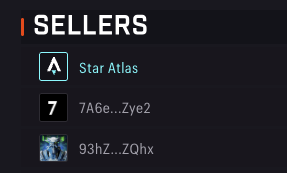
Galactic Marketplace – The “Star Atlas” seller is the team on the marketplace
In other words, buying from other players does not earn zXP. You need to buy from the team to tick this box. Although their prices are often higher than those offered by players, you help the team develop both z.ink and Star Atlas with these purchases. And, of course, you will get more z.ink airdropped when you buy from them.
Connect your Epic Games Account
This is a one-off activity intended to confirm that you successfully completed this on the dashboard. The real zXP is gained through the next item on the list.
If you have not yet installed the pre-alpha of Star Atlas, make sure to head over to the Star Atlas Discord and get a game key in their game-access-key channel. Go to the Epic Games Store, then redeem this code to install the game client.
Play Star Atlas on the Epic Games Store
There are many gameplay activities one can jump into in the UE5 client, both single-player and multiplayer. In the latter category, the team hosts matchmaking competitions 24/7 in both Gunplay and Racing modes. Participating in these specific games will earn you the following:
- In-game XP — This will unlock in-game rewards such as skins and additional inventory slots
- INK — A resource currently used in the SAGE game to craft specific items
- zXP — The zXP you are looking for!
Once a month, the team hosts a double XP weekend, during which all three rewards are doubled! Keep an eye on the Iris’ Blessing campaign to learn when these weekends are coming up (for a great way to stay up to speed, see the end of this guide).
Stake Claims to earn ATLAS and zXP
If you own any Claim Stakes, then make sure to stake these using the Faction Claims program. This program has been around for well over 2.5 years, and has been rewarding stakers with so-called R4 (4 resources: Ammo, Fuel, Toolkits, and Food).
During the O.rigin campaign, staking claims also provides zXP, so make sure to stake any you have.
Note: The team is also selling a few of these, as they will be needed in SAGE C4 when the next SAGE iteration goes live alongside the z.ink mainnet.
zXP Weighting & Distribution
Not all tasks are equal when it comes to earning zXP. In addition, zXP is not awarded immediately in all cases.
In the table below, we list the (rough) weighting of each task/activity and the (expected) frequency when zXP is being rewarded for the activity.
| Activity | zXP weighting | zXP allocation frequency |
|---|---|---|
| Play Holosim | Low | Within minutes |
| Play Star Atlas (UE5) | Medium | Every ~2 hours |
| Stake Claim Stakes | Medium | 2 AM UTC (once per day) |
| Play SAGE | Medium/High | Within minutes |
| Primary Marketplace sales | High | Within minutes |
| ATLAS Locked & PVP | High | Midnight UTC (once per day) |
As mentioned in the previous section, tasks will turn green once the first zXP has been awarded for them. Do not panic if this does not happen immediately; the table above shows it can sometimes take a while. If a task does not turn green well after it should, please request support. See the Support section below for more information.
Subscriptions
Subscribing is optional. It’s up to you to decide whether it makes sense and, if so, which subscription is best for you.
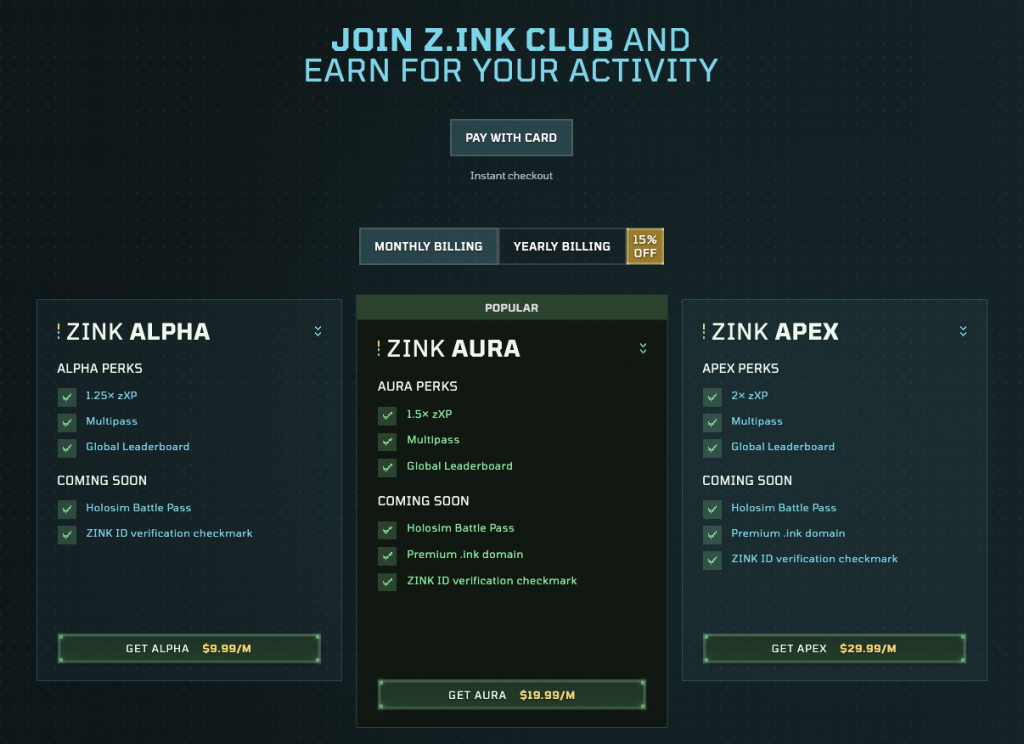
Z.ink offers three subscription tiers that unlock various benefits:
- Zink Alpha — Bottom Tier @ $9.99/month, or $101.90/year (15% off)
- Zink Aura — Middle Tier @ $19.99/month, or $203.90/year (15% off)
- Zink Apex — Top Tier @ $29.99/month, or $305.90/year (15% off)
You can manage your subscription through the Upgrade link in the top bar of the zProfile dashboard.
Z.ink Dashboard – Subscription Overview
The three tiers primarily offer the same benefits, but the weights differ. We’ll go over the various perks in full below.
Note that direct crypto payments are not currently supported (they were previously, but were disabled due to numerous issues). This means your only option is to use a credit card. You can still pay with Crypto if you have a crypto credit card, such as one offered by Solflare, Kast, Aviici, or Revolut (in some countries).
Live Perks
- zXP Multiplier — Easiest, the biggest reason for most to jump into a subscription: every zXP earned will be multiplied by a factor that depends on the subscription tier. Alpha provides a 1.25x modifier, Aura a 1.5x one, and Apex will double all zXP you earn. Note that this multiplied zXP will count towards all three progression tracks (Zink Level, Airdrop Level, Multipass Rank).
- Multipass — Unlocks the parallel Multipass progression track. This means that you will now be able to earn additional rewards (Star Atlas assets, for this first season) with the zXP you earn during an active subscription.
- Global Leaderboard — Everyone is listed on the global leaderboard, so please ignore this item.
Future Perks
Though not applicable just yet, let’s quickly go over the future perks mentioned:
- Holosim Battle Pass — You no longer need to buy a Battle Pass for upcoming Holosim Chapters. It is now integrated into your z.ink subscription.
- ZINK ID verification checkmark — This will be added to your zProfile (likely as a badge) and displayed on the leaderboard. No ETA on this feature just yet.
- Premium .ink “domain” — A bit of a misnomer; it lets you register a custom alias (name) for one of your future z.ink wallets. Instead of having to mess with the long public key, everyone will be able to send tokens to
yourname.ink, for example.
Daily Check-in Bonus
Beyond subscriptions, there is another (free-of-charge) way to unlock XP multipliers. By simply hitting the Claim button in the Daily Streak area within 24-48 hours after you last did so, you can lock in another day and expand your daily streak.
Z.ink Dashboard – Daily Streak
The first time you do this, you will right away unlock the 1% boost. After doing this 3 times, you will unlock the 5% zXP boost.
After you claim a day, you won’t be able to claim the next day within the following 24 hours. After this, you will have exactly 24 hours to make that claim. If you forget, your streak will be reset, and you will have to start anew.
Multipass
The Multipass track requires a subscription to activate. Only while you have an active subscription will zXP earned through the listed tasks count toward your Multipass progression.
If you have a subscription, the Multipass window will show you your current rank. If not, it will display an “Upgrade” button that takes you to the subscription section.
Z.ink Dashboard – Multipass (deactivated)
Z.ink Dashboard – Multipass (activated)
Separate Progression Track
Multipass offers a separate progression track that is independent of the airdrop track. It seeks to reward subscriptions, even when no airdrops are active. As such, its seasons will likely always overlap with airdrop seasons, but may not be fully in sync. It is unlikely that this first Multipass season will end before the O.rigin campaign ends, but it may extend beyond that date.
Multipass ranks are easier to achieve than Zink levels. This also means that smaller fish can relatively easily get these rewards!
Note that, unlike the global Zink level, your Multipass Rank will reset before a new season starts.
Rewards
This first Multipass season provides assets usable in SAGE C4. This next iteration of SAGE will go live alongside the z.ink mainnet. This means that these assets will be usable immediately on this new blockchain. It also means you will not receive these before the official Genesis event (i.e., the chain goes live in production).
Each rank you attain unlocks a specific set of rewards. The rewards are cumulative, so each rank you achieve will unlock additional rewards.
Below, we’ll briefly explain the rewards found in the Rank 1 and Rank 30 sets:
Note: Currently, all rewards lack quantities. These will be added after the Christmas break.
Rank 1:
Resources:
- R4 — Some Ammo, Food, Toolkits, and
- Ink — Normally obtained through UE5 gameplay; a resource used in SAGE recipes
- Drywater — A new resource used in SAGE C4 recipes
Ship Components that can be added to ships of similar (or sometimes larger) size:
- Drone – Fimbul Naga Pew — A drone that can be added to Fimbul Naga ships
- Ship Component – Shield Generator – XXS – T1
Rank 30:
Resources:
- R4
- Ink — Normally obtained through UE5 gameplay; a resource used in SAGE recipes
- Drywater — A new resource used in SAGE C4 recipes
- Platinum — A resource used in SAGE recipes
- Diamond — A resource used in SAGE recipes
- Gold — A resource used in SAGE recipes
Ship Components that can be added to ships of similar (or sometimes larger) size:
- Drone – Pearce Hulltank — A drone that can be added to certain Pearce ships
- Ship Module – Fuel Module – XS – T1
- Ship Component – Drone Port – XS – T1
- Ship Component – Warp Drive – XS – T1
- Ship Component – Hull Reinforcement – XS – T1
Crew:
- Crew Pack – Gold — Crew Cards whose stats still have to be rolled; Can be acquired on the Galactic Marketplace today
Support
If you believe something is amiss, your best bet is to join the z.ink Discord and ask your question there. There is a good chance you will be asked to create a ticket, which you can do through the #create-a-ticket channel.
Be advised that you can only access the ticket-creation channel if you’ve reached level 1 with the resident MEE6 bot. In other words, you will need to chat briefly before you can create a ticket. This should not take much effort and has been introduced as a measure to combat bot-generated ticket spam.
FAQ
Q: I’m renting my fleets to other players. Who is receiving the zXP from these fleets when they are used in SAGE? A: If you are renting your fleets out to others, those other players will earn the zXP with them, not you.
Q: Do I need to lock new ATLAS/POLIS, or new Ships for SAGE, or anything like that? Historic achievements don’t count, after all. A: There is no need whatsoever to lock new tokens or get new ships into SAGE. Historic data is disregarded means that whatever you did before the campaign started (and you created your zProfile) is ignored. But whatever you have locked now absolutely counts. And your actions in SAGE count as well, no matter if the ships are old or new.
Q: If I earn more zXP, do I get a higher airdrop allocation? A: That is exactly how it works. Keep in mind, though, that your exact allocation depends on the zXP earned by others as well. Only 10% of the Total Token Supply (10 million tokens) is available to distribute, so your token allocation depends on your participation and everyone else’s.
🎄 END OF YEAR TIP: Stay up to date on Star Atlas and z.ink by subscribing to our weekly Star Atlas newsletter!